Garage management for independent workshops

Run the day. Keep every job moving.

Bring bookings, job tickets, customer history and invoicing together. See what needs attention today, and give your team a clear next step.

New garages get a 30-day trial of Starter with both packages. No payment card needed. Keep using Free when your trial ends.

Illustration of the GarageWizz Dashboard with its six Run the day queues: open bookings, awaiting parts, past planned finish, ready for collection, ready to invoice and payment follow-up.

A clear view of the work that needs attention. Illustration based on the GarageWizz Dashboard · Example garage data

Six daily queues, each linked to the records behind it

  1. Open bookings todayScheduled and confirmed bookings today
  2. Awaiting partsAll unfinished parts holds
  3. Past planned finishActive work past its appointment end
  4. Ready for collectionVehicles still on site
  5. Ready to invoiceCompleted appointments without an invoice
  6. Payment follow-upIssued and overdue invoices

Product

From booking to invoice, keep the context.

Front desk, workshop and office work from the same bookings, jobs, vehicles and invoices. Choose a view to see it in the app.

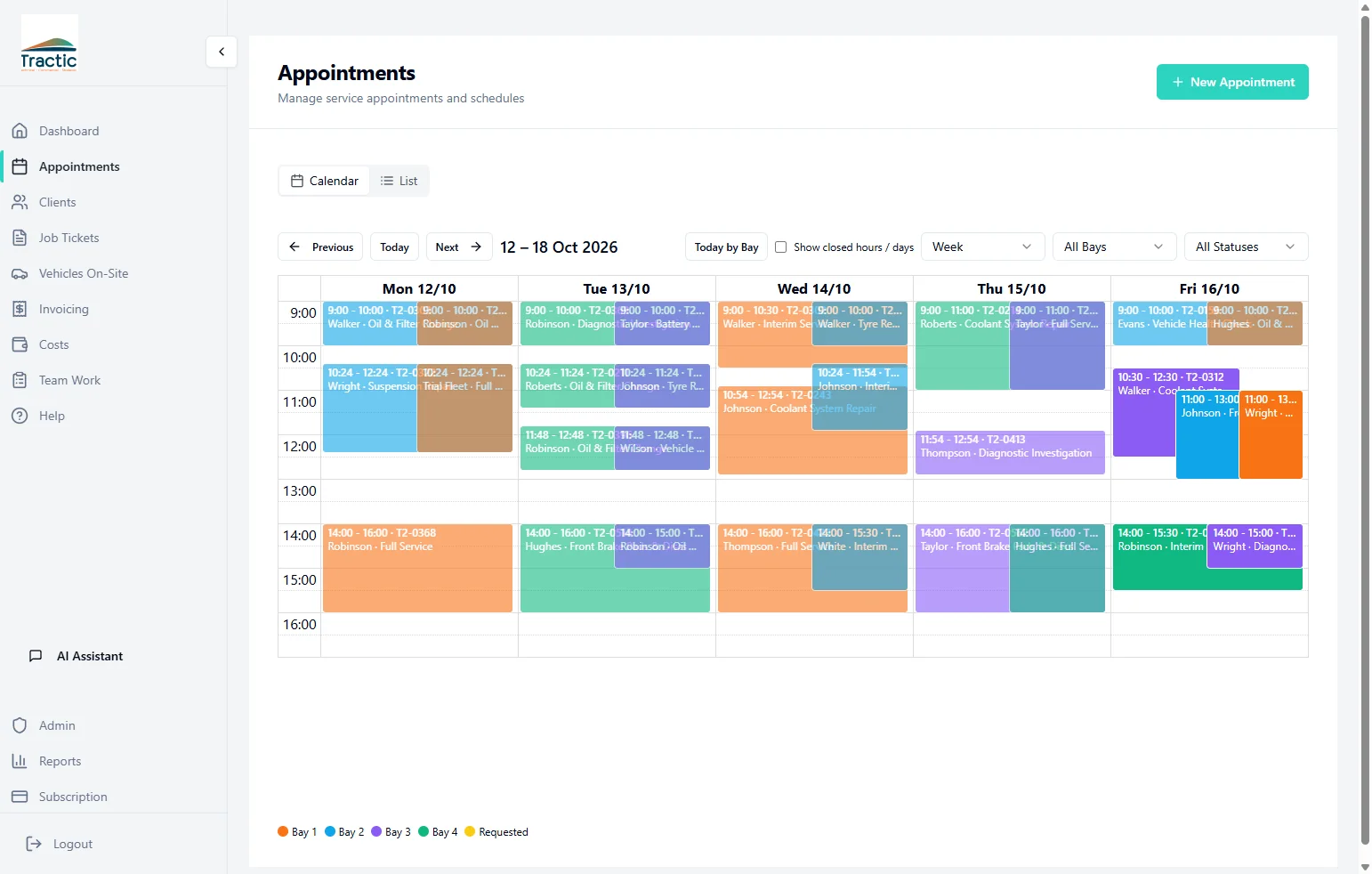
See the week across every bay before the first car arrives.

  • Week, day and bay views, with bay and status filters
  • Each booking shows its time, vehicle, customer and service
  • Bookings link to the job tickets created for them
GarageWizz Appointments calendar showing a working week of colour-coded bookings across four bays
Example garage data
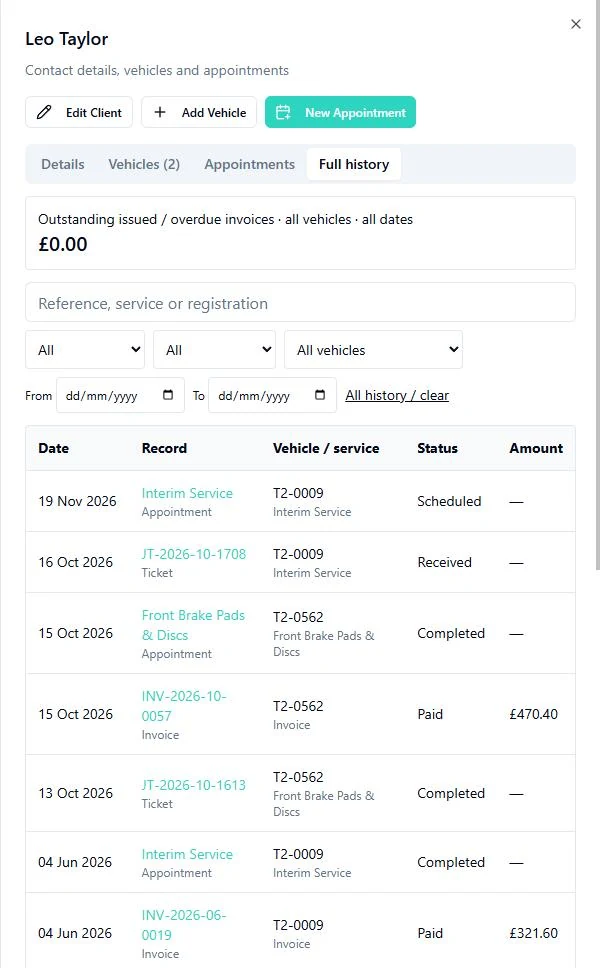
Customer record in GarageWizz with the Full history tab listing linked appointments, job tickets and invoices, with status and amount for each
Example garage data

Customer history

The history behind every visit.

Open a customer to see their vehicles and a dated history of appointments, job tickets and invoices, from last week back to earlier visits. Each entry links to its record, so staff can pick up where the last visit left off.

  • Search by name, email, phone or registration
  • Filter the history by vehicle, record type or date
  • See outstanding issued and overdue invoices at a glance

Costs & reports

See the costs behind the work.

Record costs, plan recurring expenses and explore financial, staff and workshop performance.

Business Operations Package

Costs Twelve months of direct costs and overheads, and the cost mix for October 2026.
Business Reports Each figure states its period and scope, here September 2026.
Budgets Budget against actual spend by category, with the variance spelled out.
Revenue and customers Daily invoiced revenue and the top five customers for September 2026.

Professional and Premium include the basic Dashboard tab of Business Reports. The Costs workspace and the Financial, Staff, Customers and Operations tabs need the Business Operations Package, on any plan, and Owner or Administrator access. Invoiced revenue is reported separately from payments received. Compare packages

AI Assistant

Ask your garage data a useful question.

Find unpaid invoices, look up related work and ask supported questions about garage performance.

Available to Owners and Administrators, and limited to the garage they have selected.

What you can ask

  • Revenue, open jobs and unpaid invoices, with the rows behind the answer
  • Related jobs and invoices found by meaning, such as previous brake work
  • General automotive and workshop questions

Check the Dashboard queues for today’s work.

Optional Customer Portal Package

Give customers their own service history.

Linked customers sign in to a portal branded for your garage. The garage chooses when to enable it.

  • Upcoming and past appointments
  • Their vehicles, service history and available invoice PDFs
  • Online appointment requests, when enabled by the garage
  • Rescheduling or cancelling appointments that are still requested or scheduled

Pricing

Choose the right fit for your garage.

Every plan includes appointments, customer and vehicle records, job tickets and invoicing. Prices are in GBP per month and exclude VAT.

For new garages

30-day trial

Starter plus the Customer Portal and Business Operations packages for 30 days, once per new garage, after your account and garage are set up.

  • Starter limits apply: 2 bays, 3 staff accounts, 250 customers and 300 appointments a month
  • No payment card needed and no automatic charge, even if a card is saved
  • Keep using Free after your trial.

Permanent

Free plan

The continuing base plan, not a time-limited offer: 1 bay, 2 staff accounts, 20 customers and 50 appointments a month, with core bookings, job tickets and invoicing.

Your records are kept when a trial or package ends. Free limits and package restrictions then apply, so some data and paid workspaces may no longer be usable until you choose a plan or package.

  1. Create your owner accountSign in with Google or email and complete any verification.
  2. Set up your garageGarageWizz creates the garage and confirms the trial is in place.
  3. Use the trialStarter and both packages until the end date shown in the app.
  4. Choose what happens nextKeep using Free, or contact us for help choosing a paid plan.

Free

A permanent limited plan for a single-bay workshop.

£0per month

  • 1 bay
  • 2 staff accounts
  • 20 customers
  • 50 appointments a month
  • Appointment calendar
  • Customer and vehicle records
  • Job tickets
  • Invoices with PDFs and standard CSV exports
Start free

Starter

For small workshops replacing paper and spreadsheets.

£29per month + VAT

  • 2 bays
  • 3 staff accounts
  • 250 customers
  • 300 appointments a month
  • Everything in Free
  • Technician assignments
  • Appointment and job email updates
Start free

Professional

For growing teams that need more capacity.

£69per month + VAT

  • 6 bays
  • 8 staff accounts
  • 1,000 customers
  • 1,000 appointments a month
  • Everything in Starter
  • Business Reports: the basic Dashboard tab
Start free

Premium

For larger workshops that need the most capacity.

£129per month + VAT

  • Unlimited bays
  • 15 staff accounts
  • Unlimited customers
  • Unlimited appointments
  • Everything in Professional, with more capacity
Start free

Your trial ends automatically and you can keep using Free. For help with paid plans, packages and payment setup, talk to us.

Optional packages

Add either package to any plan, including Free. Premium does not include them. Starter and higher plans already include appointment and job email updates.

Business Operations Package

£39per month + VAT

See the costs behind the work and the full picture of how the garage is performing.

  • Costs: ledger, receipts, recurring costs, CSV cost imports and budgets
  • Labour capacity, used to estimate job margins where cost data is recorded
  • All five Business Reports tabs: Dashboard, Financial, Staff, Customers and Operations
  • Accounting-ready invoice CSV templates for QuickBooks, Xero and Sage, imported manually
  • Needed for Costs and the full reports on every plan, including Premium

Customer Portal Package

£39per month + VAT

A portal branded for your garage, where linked customers sign in to see and manage their own visits.

  • Appointments, service history and available invoice PDFs
  • Customers add and update their own vehicles
  • Online appointment requests, and rescheduling or cancelling requested or scheduled appointments
  • Appointment and job email updates, subject to notification preferences

FAQ

Questions before you start.

Still deciding? Tell us about your garage and we’ll help you choose the right setup.

What do I get when I start?

Once your owner account and garage are set up, an eligible new garage gets a 30-day trial of Starter with both optional packages. Starter limits apply during the trial: 2 bays, 3 staff accounts, 250 customers and 300 appointments a month. The trial runs once per garage. Returning to the same garage does not restart its trial. The permanent Free plan is separate: 1 bay, 2 staff accounts, 20 customers and 50 appointments a month.

Do I need a payment card, and will I be charged?

No card is needed for the trial, and no payment is taken automatically. You can keep using Free when the trial ends. Contact us for help moving to a paid plan and adding your payment details.

What happens when the trial ends?

When your trial ends, your garage continues on Free. Your records are kept, but Free limits apply and trial access to the paid packages ends. Contact us if you want help choosing a paid plan or package.

Do I need the optional packages?

No. Bookings, customer and vehicle records, job tickets and invoicing work within your plan’s limits and your team’s role permissions. The Business Operations Package adds Costs and all five Business Reports tabs, and it is needed for them even on Premium. The Customer Portal Package adds the customer self-service portal. Starter and higher plans already include appointment and job email updates, so the portal is not needed just for those.

Can I bring existing customers and vehicles?

Yes. Upload a CSV file, check the column mapping and review the validation results before importing. Rows with errors are reported so you can correct them; valid rows are imported.

What can my customers do?

With the Customer Portal Package and the portal enabled, linked customers can see their appointments, service history and available invoice PDFs, and add or update their own vehicles. When the garage allows it, they can request appointments online and reschedule or cancel appointments that are still requested or scheduled.

Does it connect to Xero, QuickBooks or Sage?

GarageWizz creates accounting-ready CSV files in QuickBooks, Xero and Sage formats, which you import into your accounting software yourself. There is no automatic synchronisation. These templates need the Business Operations Package and export permission; standard invoice CSV exports do not.

Who can use reports and AI?

The AI Assistant is available to Owners and Administrators. Professional and Premium include the basic Dashboard tab of Business Reports; the other four tabs and Costs need the Business Operations Package. Every plan has the operational home Dashboard with its daily queues. Technicians and front-desk staff get the views their role allows.

Can we use it on a phone?

Yes, in a mobile web browser. GarageWizz is a web application, so there is no separate iOS or Android app and it needs an internet connection.

Why GarageWizz

Built to make independent garages easier to run.

GarageWizz started with a simple belief: workshop software should reduce pressure, not create more of it. The platform brings operations, customer communication and business insight together so teams can work consistently from first booking to vehicle collection.

“There had to be a better way.” — Olivier Andre, founder

Bring the workshop into one clear view.

Start free